With this simple tool you can easily and automatically know what is my IP from which I am connected to the Internet.
This is your IP Address.
Información Geop IP
| City (*) | Columbus |
| Region | Ohio |
| Country | US |
| Longitude/Latitude | 39.9612 | -82.9988 |
| Time zone | America/New_York |
| Node | |
| Supplier | AS16509 Amazon.com, Inc. |
[[Publi]]
What is an IP address
Without getting too technical, an IP address is a set of numbers (4 numbers in the IPv4 format and 6 in the IPv6 format) that are automatically or manually assigned to each device that is part of a network.
This set of numbers uniquely identifies each device, for example a computer, and allows it to communicate via IP (Internet Protocol) with other devices, colloquially speaking it is like an identification number, or in a telephone simile the “telephone number”.
The format of an IP address (in IPv4 format) has this type of format 192.168.0.1. This format and range of IPs from 192.168.0.1 (normally reserved for the router) to 192.168.0.255 is the most common for configuring local networks.
How useful is it to know what my ip is?
Normally, whether in home or professional environments, our computers and/or mobile devices such as smartphones or tablets connect to the Internet using a router that is part of our home or corporate network. This router has two addresses, an internal and an external one called public IP, so the method of detecting the address depends on one or the other.
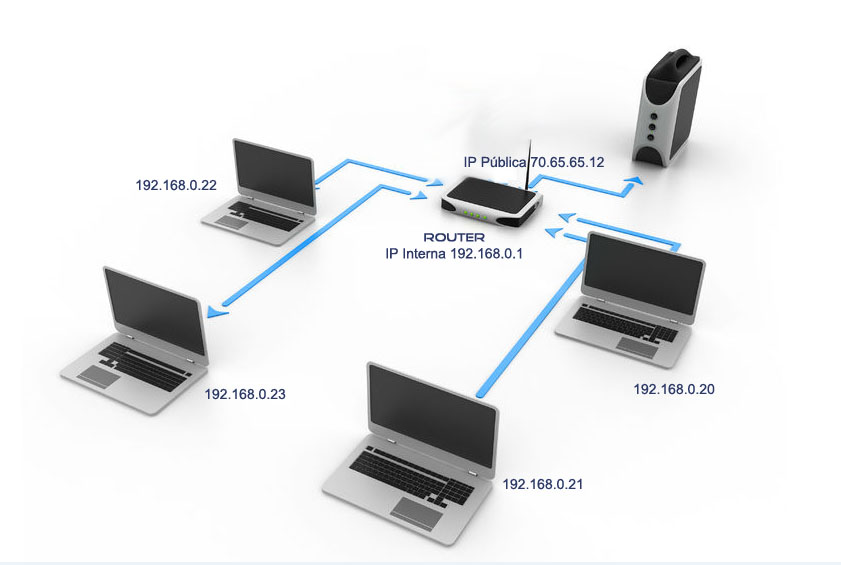
The external or public IP address of the router identifies our router within the global network. It is provided by our provider and connects us to the Internet. It can be useful to diagnose Internet connection problems, to know the geographical area from which we connect through our operator, and other advanced configuration aspects.
The internal IP address of the router, is the one that allows it to establish communication with all the devices of our local network and to make of “connection bridge” between each one of the devices with other external devices, for example a Web server that is outside the Local Network.
When do I need to know my address?
Normally and in the most everyday uses, except for curiosity, we do not need to know our address.
It is important to know that when we surf the Internet our IP does not follow us at all times. Our navigation leaves a “trace” of our visit to any site we browse.
Sometimes, for technical reasons for example, we need to know which is my IP:
- Configure certain services
- Access servers or Webs that allow connection to restricted or known IPs.
- To have a remote connection to our equipment.
- Install server services, e.g. mail or Web services.
In both private and public addresses, we can find both static and dynamic IP addresses. The type will depend on whether this address is manually assigned or automatically assigned.
Static IP
Whether in our router or in our computer, the value of our address is configured manually. Once configured, it will remain fixed and will always be the same.
Dynamic IP
Normally, home Internet connections are configured using a dynamic IP assignment in the router. This means that when we turn on the router, our provider assigns it an address automatically.
This IP address can be changed simply by turning the router off and on again. This can be useful as a security measure or to get a different address for our connection.
The management of IP address assignments is usually done by a DHCP (Dynamic Host Configuration Protocol) server, which is in charge of controlling ranges and addresses for that network.
IP ranges according to type of private network
Although we have mentioned that with IP V4, in theory any combination could be used, in practice three types of ranges are used for private networks.
| Type | Range (start) | Range (end) | No. address |
|---|---|---|---|
| Class A | 10.0.0.0 | 10.255.255.255 | 16.777.216 |
| Class B | 172.16.0.0 | 172.31.255.255 | 1.048.576 |
| Class C | 192.168.0.0 | 192.168.255.255 | 65.536 |
Private networks are understood, although it may seem obvious, to be those networks that are not public or are not part of the Internet. Within the same local area network (LAN), are all computers/devices connected within the same range of addresses.
With everything discussed in the post, if you want to know what is my ip, just click the button!